
WinEEG FIRST START ERRORSmitsarweb2025-03-23T15:17:31+03:00
Skip to main content
WinEEG FIRST START ERRORS
How Can We Help?
-
WinEEG research software
-
Mitsar-EEG systems
- Amplifier functional test / Calibration signal.
- Amplifier TTL input pinout and connector type
- AUX channel for stimuli detection or event marks.
- D-Sub EEG cap connector pinout
- ECG/EOG/EMG biosignals recording
- Mitsar-EEG-BT reference electrode options
- WinEEG activation with code
- WinEEG dongle setup / checking your license
-
Other
-
SmartBCI wireless EEG
-
Troubleshooting
-
Electrodes and accessories
-
Neurofeedback
-
Event Related Potentials (ERP)
- ERP calibration procedure for Mitsar-EEG-BT
- ERP calibration procedure w/ SmartBCI and SmartSYNC module
- ERP dialog window tips
- Independent components (ICA) of ERPs
- Subject response (patient button) processing setup for ERP analysis.
- What information is in EDF+ annotations?
- What labels are exported to EDF+?
- WinEEG and e-Prime connection
- WinEEG and Psytask setup for ERP
-
EEGStudio
WinEEG FIRST START ERRORS
Posted
Updated
Bymitsarweb
WIKI:
WinEEG FIRST START ERRORS
(side-by-side configuration or mfc140.dll error)
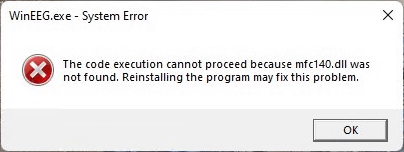
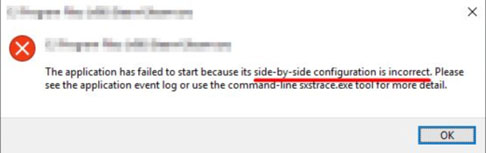
If you have successfully installed the WinEEG software and are trying to run it for the first time, you may see one of the following error messages:
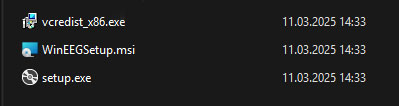
Then you should click OK to close this message and open again the source folder with installation files for WinEEG.
Run the file vcredist_x86.exe you will find in the WinEEG folder and install the Microsoft Visual C++ software.
Now you can run WinEEG software. If you still have any issues with the software, please, fill free rto contact our support.
Table of Contents
